
BC PROTECT+ and Your Bitget Account Registration
The current article does not support the language you selected, it has been automatically recommended to English for you
BC PROTECT+ and Your Bitget Account Registration
[Estimated reading time: 5 mins]
Background
Recently, Brazil's Central Bank (Banco Central do Brasil) released new regulations effective December 1, 2025, introducing BC PROTECT+ — a fraud protection system that allows users to request protection against unauthorized account opening.
While BC PROTECT+ is designed to safeguard your identity, if you have activated a protection request, all financial institutions (including cryptocurrency exchanges) are unable to open new accounts or add you as an account holder or representative on existing accounts until the protection is deactivated.
If you're experiencing issues registering or completing account verification on Bitget, it may be due to an active BC PROTECT+ protection request on your profile.
How to Check If BC PROTECT+ Is Blocking Your Account
Step 1: Access the BC PROTECT+ Portal
-
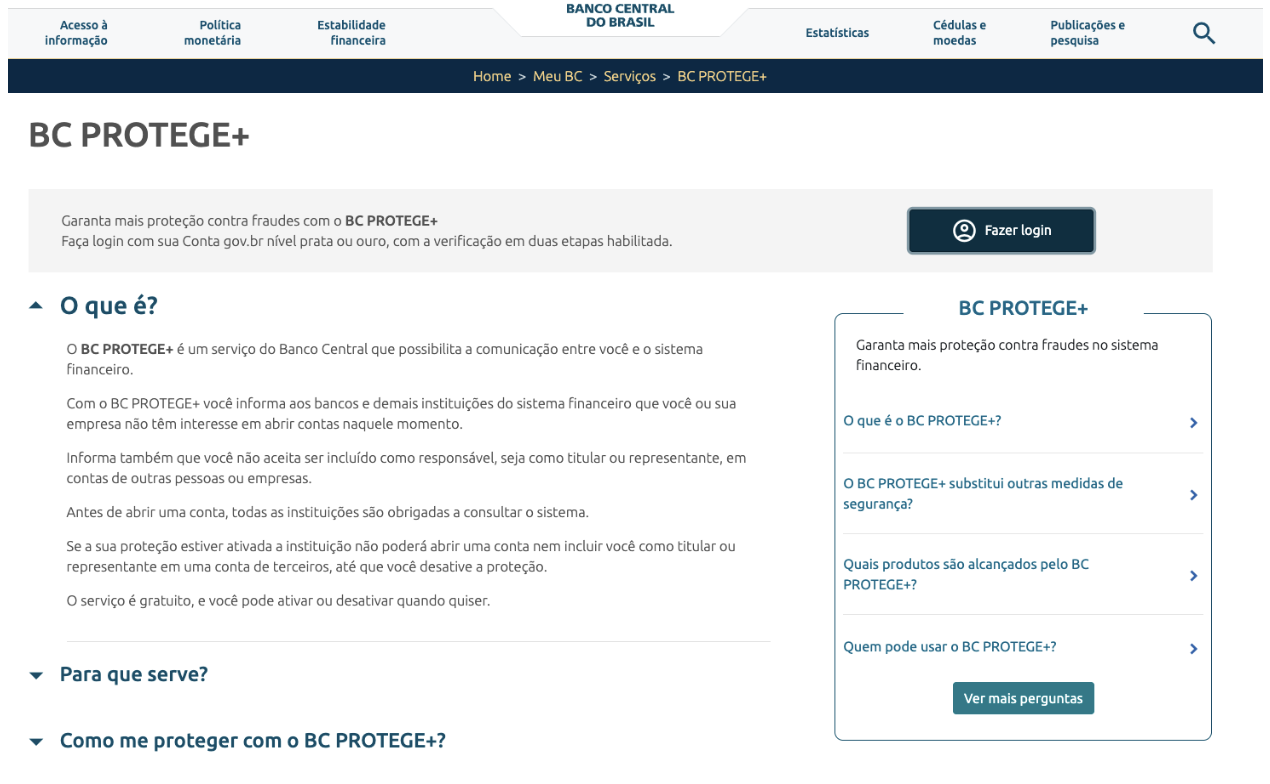
Visit the official Brazilian Central Bank website: https://www.bcb.gov.br/meubc/bcprotege
-
This is the only official channel to check and manage your protection status
Step 2: Log In with Your Credentials
-
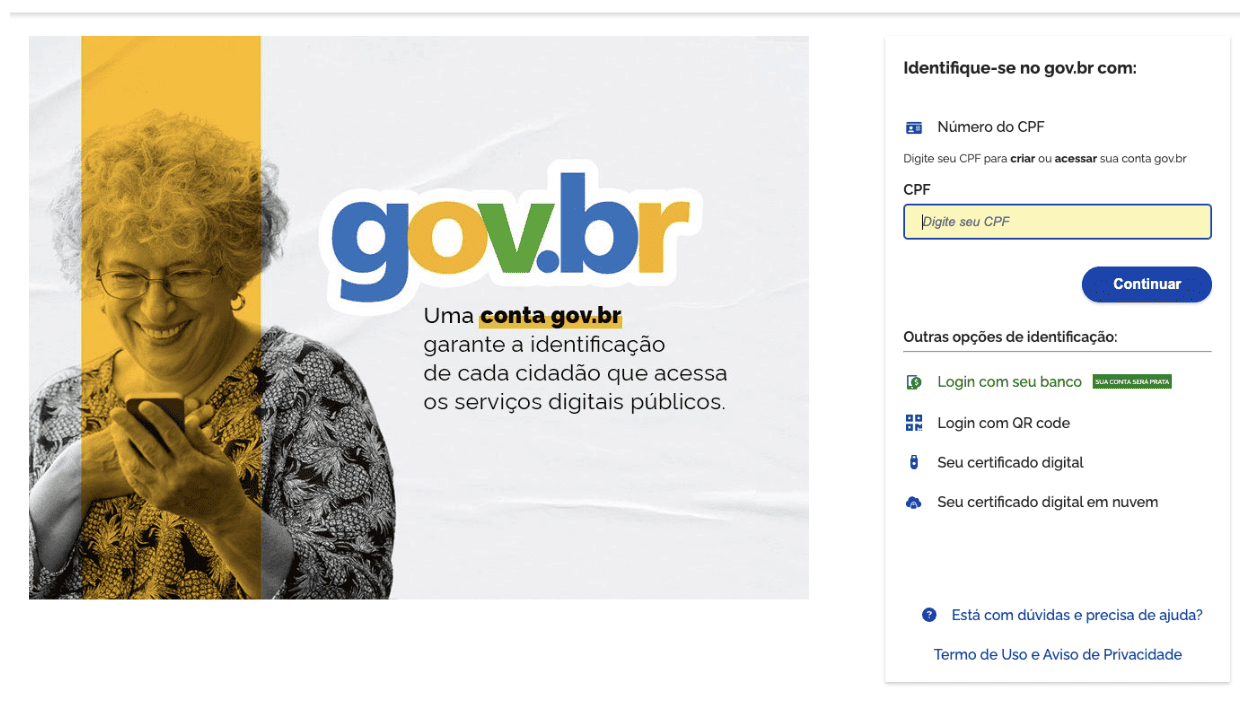
Use your Brazilian CPF (taxpayer ID) and banking credentials to access your profile
-
The system will authenticate your identity through your registered financial institution
Step 3: Check Your Protection Status
-
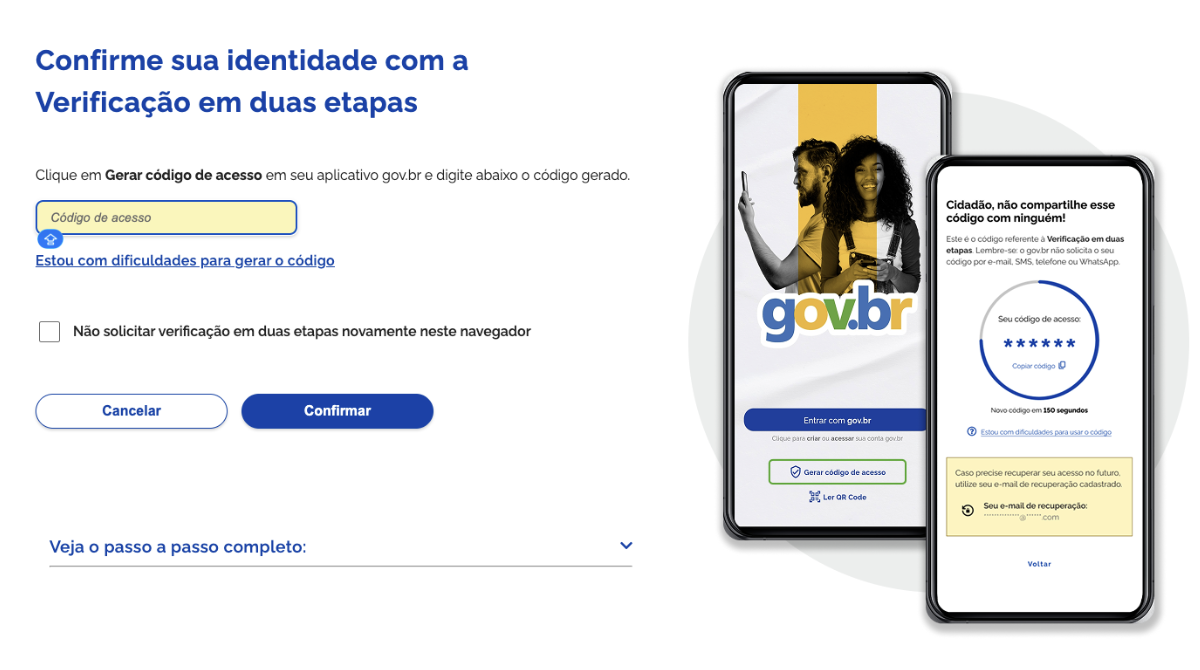
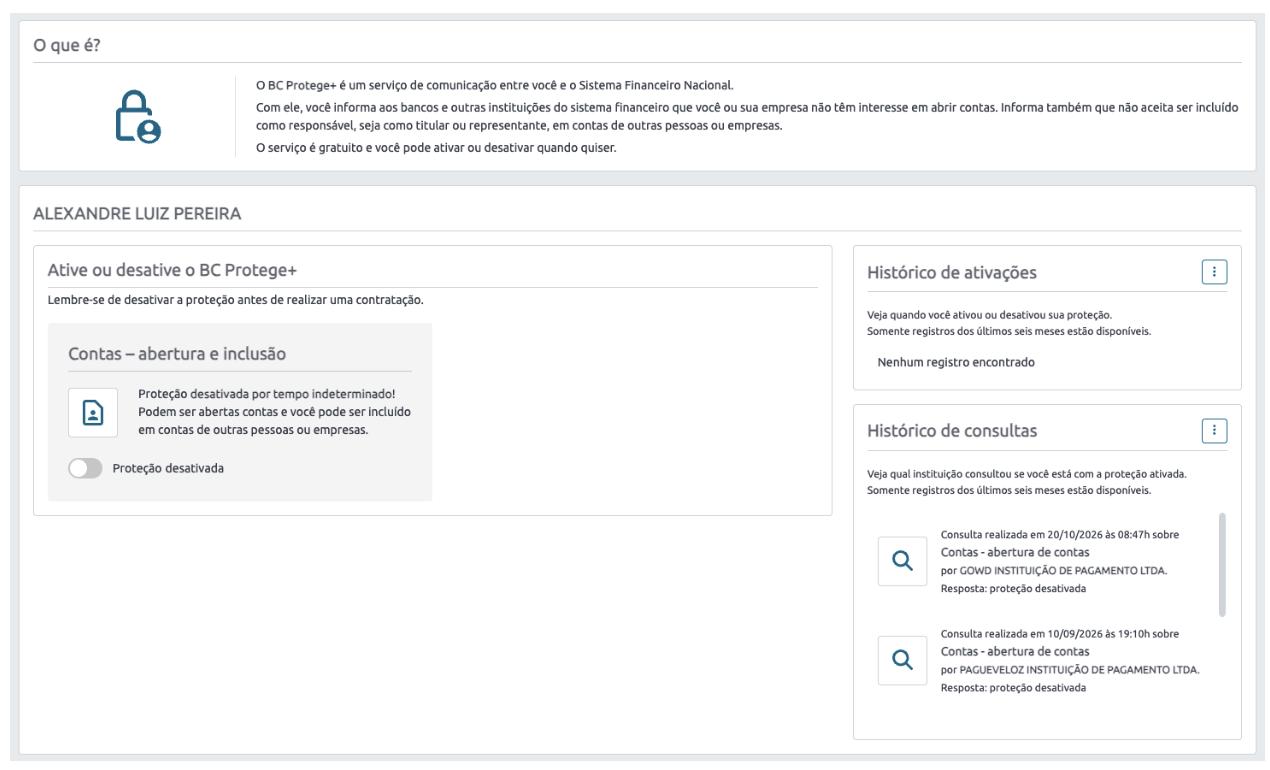
Once logged in, navigate to the "Meu BC" (My BC) section and locate your BC PROTECT+ status:
|
Status
|
Meaning
|
Action Required
|
|
Active / Activated
|
Protection is currently blocking new account openings
|
You must deactivate it to proceed with Bitget registration
|
|
Inactive / None
|
No active protection; BC PROTECT+ is not the issue
|
The problem may be related to document quality, network issues, or other verification requirements
|
Step 4: Review Your Details
-
Confirm that the information (name, CPF, personal details) associated with the protection request matches your identity
-
If you see protection requests you did not authorize, note these details — you may need to report them to the Central Bank
How to Deactivate BC PROTECT+ and Resume Account Registration
Step 1: Prepare Required Information
Before you proceed, gather:
-
Your Brazilian CPF (Cadastro de Pessoa Física)
-
Your banking credentials or access method to your registered financial institution
-
A valid email address associated with your account
Step 2: Access the Central Bank's Deactivation Portal
-
Log in using your CPF and bank credentials
-
Locate your active BC PROTECT+ protection request
Step 3: Deactivate the Protection Request
-
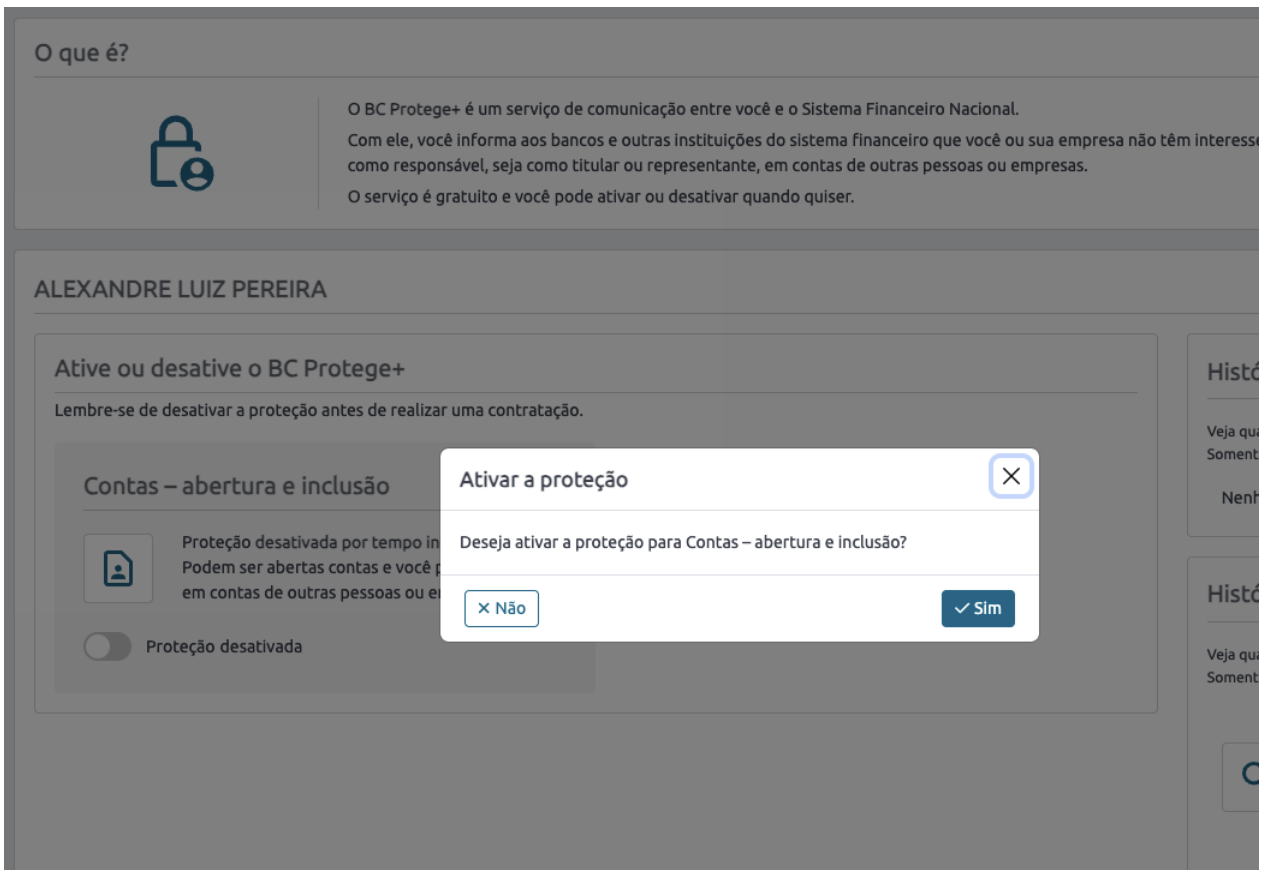
Select the protection request you wish to remove
-
Click on the "Deactivate" or "Remove Protection" option (exact wording may vary depending on system language)
-
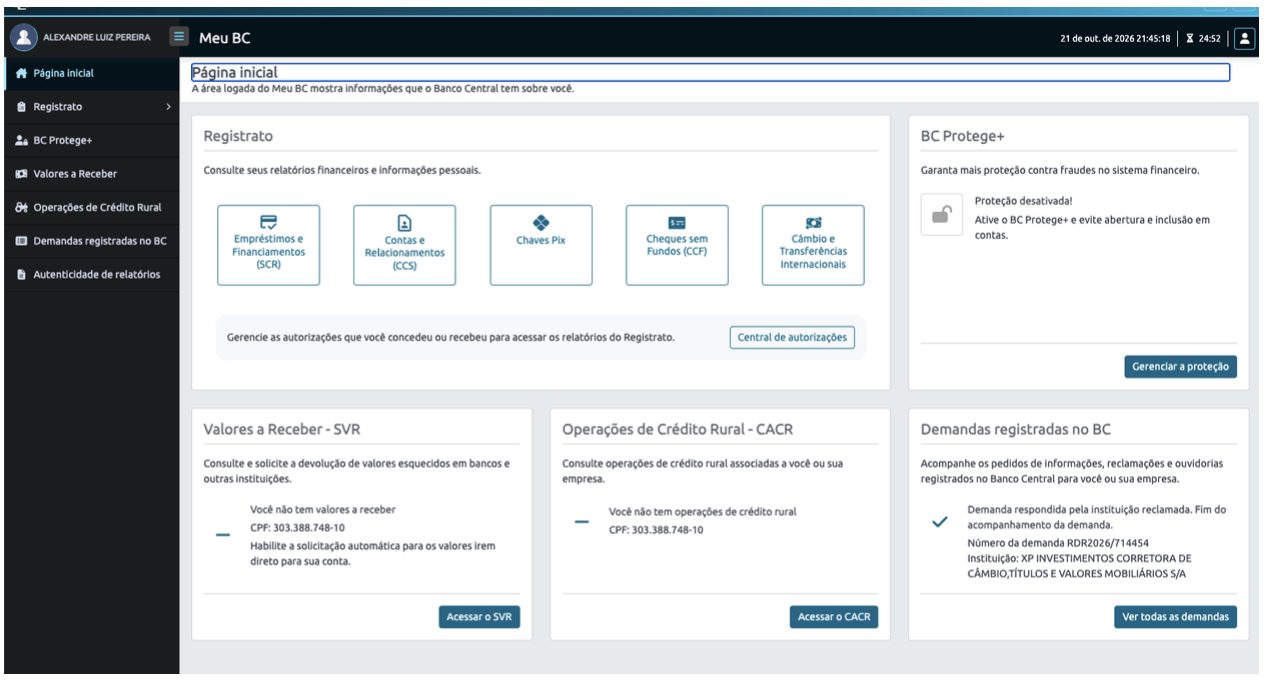
Follow any additional verification steps required by the Central Bank
-
You may be asked to confirm via SMS, email, or your banking app
Step 4: Confirm Deactivation
-
Once deactivation is complete, the system will display a confirmation message
-
The Central Bank may take up to 1-2 business hours to process the change and update their records across all financial institutions' databases
Step 5: Complete Your Bitget Registration
-
After receiving confirmation that BC PROTECT+ protection is deactivated, return to Bitget
-
Restart or complete your account registration process
-
All verification checks should now proceed normally
FAQs
1. Why can’t I use BRL fiat deposit/withdrawal on Bitget?
If you have an active BC PROTECT+ protection request, Bitget and our fiat service providers cannot access your personal data through the Central Bank of Brazil’s verification system. This prevents KYC verification from completing successfully. To restore access to BRL fiat services, you must first deactivate BC PROTECT+.
2. Is it safe to deactivate BC PROTECT+?
Yes. Deactivating BC PROTECT+ only allows financial institutions to verify your identity for account opening. It does not expose your personal data to unauthorized parties. You can reactivate it at any time if needed.
3. How long does it take for the deactivation to take effect?
It typically takes 24–48 hours (business days) for the deactivation to be fully processed and reflected across all financial institutions, including Bitget. We recommend waiting at least 48 hours before attempting to register again.
4. Can Bitget manually override or bypass BC PROTECT+ restrictions?
No. BC PROTECT+ is a privacy-protected system managed by the Central Bank of Brazil. Bitget cannot access, modify, or bypass this restriction. Only the Central Bank can deactivate the protection, and only you (through your Gov.br account) can request deactivation.
5. What should I do if I still cannot register after 48 hours?
If you've waited 48 hours and confirmed your BC PROTECT+ status is "Inactive," but still cannot complete registration:
First, verify with the Central Bank of Brazil (BCB) that your protection status is fully deactivated and data has been synchronized across all institutions.
Second, check with your bank to ensure they can access your CPF data for verification.
Finally, if both confirmations are positive but Bitget KYC still fails, contact Bitget Support with:
-
Screenshots showing your BC PROTECT+ status as "Inactive/None" from the BCB portal
-
Details of the error message received during KYC submission
-
Timestamps of when you deactivated the protection
Bitget Support can help re-trigger the KYC verification process or investigate technical issues, but cannot manually override BC PROTECT+ restrictions.
6. Is BC PROTECT+ a penalty or risk flag on my account?
No. BC PROTECT+ is a voluntary security feature that you activated to protect your identity from fraud. It is not a penalty, blacklist, or risk flag. Many Brazilian citizens use this service proactively.
7. Will deactivating BC PROTECT+ affect my existing bank accounts?
No. Deactivating BC PROTECT+ only allows new account openings. It does not affect your existing bank accounts, credit cards, or other financial products. Your current accounts remain unchanged.
8. Can I reactivate BC PROTECT+ later if needed?
Yes. You can reactivate BC PROTECT+ at any time through the same portal. However, please note that reactivating it will again block all financial institutions from opening new accounts for you until you deactivate it again.
For more information, visit the official Brazilian Central Bank website or contact your registered financial institution. This FAQ applies to users registering on Bitget from Brazil. Regulations and procedures may change — always refer to the official Central Bank portal for the most current information.
*This announcement is time-sensitive. Please note the date of publication. The platform assumes no responsibility for any direct or indirect losses arising from changing circumstances or outdated content.